
A “Key not detected” message can leave your Kia Optima sitting silent even though the fob is right beside you. Sometimes, the remote also stops unlocking the doors. In other cases, the buttons work normally, but the car refuses to start.
A weak fob battery is a sensible starting point, although several faults can cause similar symptoms. Knowing which checks to make first helps you avoid replacing a working key or paying for repairs your car doesn’t need.
What It Means When Your Optima Doesn’t Detect the Key
On an Optima equipped with a smart key, the vehicle and fob exchange signals before certain functions are allowed. The system checks for a valid key before authorizing a start. If that exchange fails, having the correct fob inside the cabin may still produce a warning instead of a running engine.
However, remote unlocking and starting aren’t identical tests. Your fob might unlock the doors while the vehicle struggles to detect it inside. Conversely, a depleted fob battery can prevent normal remote operation while the emergency starting method still works.
The exact dashboard message matters. “Key not detected” points to a detection problem, while a request to press the brake pedal or shift into Park calls for a different check. A starting problem by itself doesn’t confirm that the key needs replacement. Kia distinguishes these messages in its owner documentation.
These checks mainly apply to Optimas with a factory smart key and push button ignition. If your car uses a conventional ignition key, a failed remote button doesn’t automatically explain why the engine won’t start. Also, emergency starting procedures differ between model years, so use the instructions for your particular vehicle.
Kia Optima Not Recognizing Key Fob: Common Causes
Several problems can interrupt communication between your Optima and its key. The way the fault behaves helps you decide which possibility deserves attention first.
1. A Weak or Incorrectly Installed Fob Battery
A remote that gradually loses range gives you a useful clue. If you previously unlocked the car from across the driveway but now need to stand beside the door, the fob battery deserves an early check.
A weak battery may still provide enough power for an indicator light without delivering reliable operation. Kia’s service information specifically notes that the fob light can continue working when the transmitter battery is low. Therefore, a flashing light doesn’t rule out battery trouble.
If the fault began immediately after battery replacement, check the installation before buying another key. The battery must match the specified type and sit in the correct position. An unsuitable cell or reversed installation can leave the fob unable to operate.
2. Signal Interference Near the Key
A fob stored beside an active phone can behave differently from the same fob held separately. Kia warns that phones, radio transmitters, and nearby operation of another vehicle’s smart key can interfere with smart key operation. A problem that appears only in one location makes interference worth considering.
This possibility is especially relevant when the fault comes and goes without any change to the key. Still, intermittent operation doesn’t prove interference. A weak battery or damaged fob can also work inconsistently, so compare the results after separating the key from nearby devices.
3. Damage Inside the Fob
A key that stops working after a wash cycle, spilled drink, or hard fall needs a closer look. Kia cautions that moisture, static electricity, heat, and physical damage can affect smart key operation. The outside shell may remain intact even when the electronics no longer work correctly.
Look for a cracked housing, a loose battery cover, or a button that stays pressed. These observations won’t reveal every internal fault, but they help establish whether the problem followed a specific incident.
A working spare is particularly useful here. If it starts the car normally under the same conditions, the original fob becomes the stronger suspect. That comparison is more useful than repeatedly pressing buttons on a key that has already suffered damage.
4. A Weak Vehicle Battery
The coin battery inside the fob and the vehicle’s battery serve different purposes. Replacing the small battery won’t correct inadequate electrical power in the car.
Dim cabin lights, slow engine cranking, or lights that fade sharply during a starting attempt suggest checking the vehicle battery before focusing entirely on the key. Kia’s starting guidance uses a dimming or extinguishing interior light as a sign of a discharged battery. These symptoms call for a battery assessment, although they don’t identify every possible starting fault.
5. A Vehicle Detection Fault or an Unregistered Key
The smart key system includes vehicle antennas, a receiver, and a control unit. A problem within that system can interrupt detection even when the fob itself is usable. If two previously working keys fail in the same way, a vehicle fault deserves consideration.
A recently purchased replacement presents a different possibility. Matching the original shell or button layout doesn’t establish that the key is correct or registered to your car. If a replacement has never started the vehicle, have its compatibility and registration checked before assuming the car has developed a new fault.
Kia Optima Not Recognizing Key Fob: DIY Fixes
Start with checks that help separate a fob problem from a vehicle problem. After each change, test the same function again so you can tell what actually helped.
1. Confirm the Starting Conditions and Remove Interference
Park safely, apply the parking brake, and make sure the transmission is in Park. Bring the correct key fully inside the passenger compartment, press the brake pedal, and make one normal starting attempt. On equipped Optimas, pressing the start button without the brake can select accessory mode instead of starting the engine.
Next, take the fob out of your bag or pocket. Keep it separate from your phone, other smart keys, and any signal blocking pouch. Hold it inside the cabin and try again. Kia specifically recommends keeping the smart key away from a phone that may interfere with its signal.
Read the resulting message carefully. If the car now asks you to press the brake or select Park, follow that instruction instead of treating every failed attempt as key rejection. If the brake lights don’t operate, arrange a repair before driving. Don’t bypass a starting interlock to keep using the vehicle.
2. Try Your Previously Working Spare Key
Keep the suspect fob away from the car while testing the spare. Use a key that has already started this Optima successfully, rather than an unverified replacement. Check remote unlocking and normal starting separately, then compare the results with the original key.
If the spare works, concentrate on the original fob’s battery, condition, or registration history. If both fail, consider shared causes such as interference or vehicle power before buying replacement keys. A spare that has been unused for years may also have a depleted battery, so its failure alone doesn’t confirm a vehicle defect.
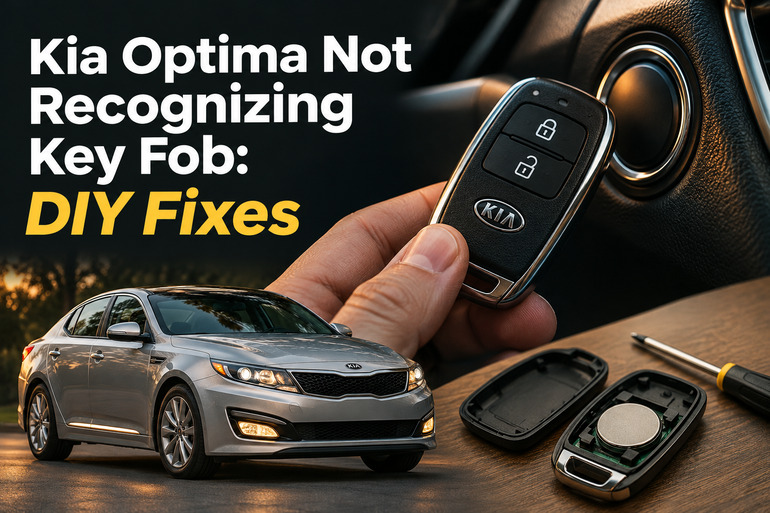
3. Replace the Fob Battery Carefully
Check the owner’s manual and the marking on the existing cell before purchasing a replacement. Kia specifies a 3 volt CR2032 battery for the Optima smart key covered in its published instructions, but confirm the requirement for your actual fob, especially if it has been replaced previously.
Follow the opening method shown for your key.
- Remove the mechanical key if the instructions require it.
- Open the cover gently at the intended slot.
- Note the battery’s orientation before removing it.
- Fit the correct new cell in the specified position.
- Reassemble the cover without forcing it.
Test the lock and unlock buttons, then try starting normally. If nothing improves, recheck the battery type and orientation before moving on. Avoid bending contacts or scraping the circuit board. Keep both new and used coin batteries away from children, since swallowing one requires immediate medical attention.
4. Use the Emergency Starting Method for Your Model
If remote unlocking fails, check your manual for access using the mechanical key stored inside the fob. The door lock arrangement varies, so don’t pry off handle trim without the correct instructions. Mechanical entry gives you access to the cabin even when normal remote operation is unavailable.
On Optimas whose manual specifies this procedure, keep the transmission in Park and the brake pedal depressed, then use the smart key itself to press the ENGINE START/STOP button. Kia documents this method for a weak fob battery or abnormal smart key operation.
Some earlier systems instead use a dedicated smart key holder. Follow that procedure if your manual identifies one, rather than assuming every Optima starts by touching the fob to the button. Successful emergency starting helps narrow the problem, but persistent failure during normal use still needs attention.
5. Check for Signs of Low Vehicle Power
Before making further starting attempts, observe the cabin lights and dashboard. Note whether they illuminate normally, become unusually dim, or switch off during the attempt. Also note any slow cranking or clicking. Give those details to a battery service provider instead of reporting only that the key doesn’t work.
If the signs suggest a discharged vehicle battery, arrange a battery and charging system test. Follow your exact owner’s manual if considering a jump start, or use roadside assistance if you’re unsure. Don’t attempt it on a battery that is leaking, visibly damaged, or suspected to be frozen.
For an Optima Hybrid or Plug in Hybrid, use the instructions for that version. Stay away from orange cables and high voltage components. Also, avoid disconnecting the vehicle battery simply to attempt a key reset. Establishing whether the car has adequate power is a clearer next step than adding another change to the diagnosis.
6. Contact a Kia Technician or Qualified Automotive Locksmith
Arrange professional diagnosis if a fresh, correctly installed fob battery doesn’t help, both known working keys fail, or the emergency starting method becomes your only reliable option. The same applies when the warning returns after a brief improvement. A repeated fault needs a confirmed cause before parts are replaced.
Bring every available key and explain exactly what works. Useful details include whether remote unlocking succeeds, whether the spare behaves differently, and whether the problem began after water exposure or a battery change. Also mention whether it happens everywhere or only at one parking location.
A Kia technician can assess the vehicle’s detection and starting systems, while a qualified automotive locksmith may help with key testing and registration. Ask the provider to confirm that they support your Optima’s year and key system. If the car remains stranded or has electrical damage, arrange assistance instead of continuing repeated attempts.
Wrapping Up
A Kia Optima that won’t recognize its key needs a few careful comparisons before it needs replacement parts. The dashboard message, the spare key’s behavior, and the result of the correct emergency starting procedure can each help narrow the fault. Change one thing at a time so the results stay useful.
Start with the key’s location and battery, then consider the vehicle’s electrical condition. If normal detection remains unreliable, bring your observations and available keys to a qualified professional. Clear details can help turn an intermittent complaint into a problem that can be properly tested.