
There’s nothing quite as frustrating as pressing your Nissan Note key fob buttons and getting absolutely nothing in response. You’re standing in a parking lot, pressing the unlock button repeatedly, and your car just sits there ignoring you completely.
This happens to thousands of Nissan Note owners every year, and the good news is that most key fob problems have simple fixes you can handle yourself. From dead batteries to signal interference, I’ll walk you through exactly what’s going wrong and how to get your key fob working again.
What Happens Inside Your Key Fob
Your Nissan Note key fob is basically a tiny radio transmitter that sends coded signals to your car. Every time you press a button, the fob sends out a unique radio frequency that tells your car to lock, unlock, or perform other functions. Think of it like a TV remote, except it’s talking to your car instead of your television.
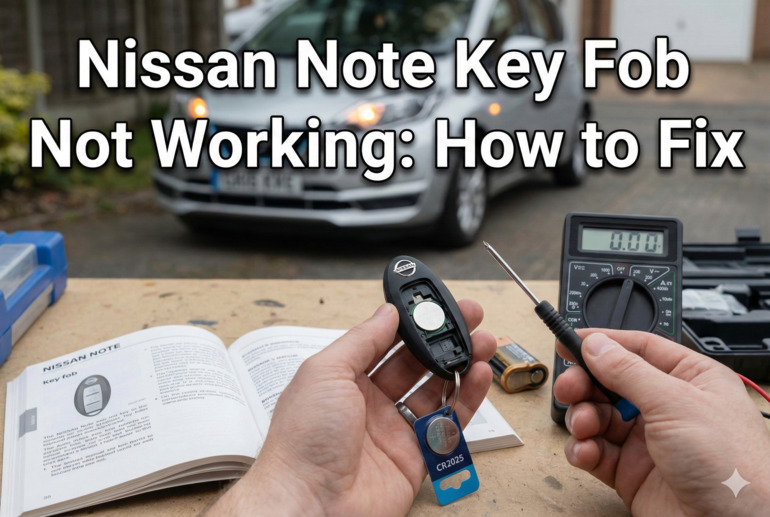
Inside that small plastic case, there’s a circuit board, a battery, buttons with rubber contacts, and an antenna. All these parts need to work together perfectly for your fob to communicate with your vehicle. The circuit board processes your button press and creates the signal, while the battery powers everything.
Your car has a receiver module that’s constantly listening for signals from your specific key fob. Each fob is programmed with a unique code that matches your car’s security system. This prevents someone else’s Nissan Note key from unlocking your vehicle.
Problems occur when any part of this communication chain breaks down. Sometimes it’s as simple as a weak battery that can’t transmit a strong enough signal. Other times, dirt or moisture might interrupt the electrical connections inside the fob. Physical damage can crack circuit boards or break the tiny components soldered onto them. Understanding this basic operation helps you troubleshoot more effectively.
Nissan Note Key Fob Not Working: Likely Causes
Several issues can stop your key fob from functioning properly. Some are incredibly simple fixes, while others might require professional attention or replacement parts.
1. Dead or Weak Battery
This is hands down the most common reason your key fob stops working. The small battery inside your fob typically lasts between two to four years, depending on how often you use it. Every button press drains a tiny bit of power, and eventually the battery just runs out of juice.
You might notice the key fob working inconsistently before it dies completely. Maybe you need to press buttons multiple times, or stand closer to your car than usual. These are classic signs of a dying battery that needs replacement soon.
2. Worn Out Button Contacts
Every key fob has rubber pads underneath each button that make contact with the circuit board. Over time, these rubber contacts wear down from repeated pressing. This is especially true for the unlock button since most people use it several times daily.
The rubber can become compressed, dirty, or cracked after years of use. Once the contact pad stops making a solid connection with the circuit board, that button becomes unreliable or stops working altogether. You might find that some buttons still work while others don’t, which points directly to this issue.
Dirt and oils from your fingers also build up on these contacts over time. This residue creates a barrier that prevents proper electrical contact between the rubber and the board.
3. Water Damage or Corrosion
Key fobs aren’t waterproof, even though many people accidentally put them through the washing machine or drop them in puddles. Moisture seeps into the case through the tiny gaps around the buttons and where the case halves meet.
Once water gets inside, it can corrode the battery contacts, damage the circuit board, or short out electronic components. You might see greenish or white crusty deposits on the battery contacts or circuit board. This corrosion prevents electricity from flowing properly.
4. Physical Damage to Internal Components
Dropping your key fob on concrete or stepping on it can crack the circuit board or knock loose the tiny surface-mounted components soldered to it. These parts are incredibly small and delicate. Even a hairline crack in the circuit board can break the electrical pathways.
Sometimes the damage isn’t visible from the outside. The plastic case might look fine, but the circuit board inside could be broken. This type of damage usually means you’ll need a replacement fob rather than a repair.
5. Programming Issues or Signal Interference
Occasionally, your key fob loses its programming connection with your car’s receiver. This can happen after a dead battery sits too long or following certain electrical work on your vehicle. The fob and car simply stop recognizing each other.
Signal interference is less common but still possible. Strong radio frequencies from nearby sources can temporarily block your fob’s signal. Cell phone towers, radio stations, or even some electronic devices can create interference, though this usually affects your fob only in specific locations.
Metal objects close to your car can also reflect or absorb the radio signal. Parking near large metal structures or inside metal garages sometimes weakens the signal strength enough to cause problems.
Nissan Note Key Fob Not Working: How to Fix
Most key fob issues have straightforward solutions you can tackle at home with basic tools. Let me walk you through each fix step by step, starting with the easiest and most common solutions.
1. Replace the Battery
Start here because it solves about 80% of key fob problems. You’ll need a small flathead screwdriver and a new CR2032 battery, which costs less than five dollars at any drugstore or supermarket.
Pop open your key fob by finding the small slot on the side and gently prying the case apart. Be careful not to crack the plastic. Inside, you’ll see the circuit board and battery. Note which direction the battery is facing before you remove it. The positive side (marked with a plus sign) usually faces up.
Replace the old battery with a fresh one, making sure it sits in the same orientation. Snap the case back together and test all your buttons. Your fob should work immediately if the battery was the culprit.
2. Clean the Button Contacts
Open your key fob just like you did for the battery replacement. Remove the circuit board carefully by noting how it sits in the case. You’ll see the rubber button pad underneath.
Use isopropyl alcohol (rubbing alcohol) and a cotton swab to clean both the rubber contact points and the corresponding spots on the circuit board. The alcohol removes oils, dirt, and light corrosion without damaging the electronics. Let everything dry completely before reassembling. This takes about ten minutes.
3. Check and Clean Corrosion
If you see any greenish or white crusty buildup on the battery contacts or circuit board, you need to clean it off. Use a cotton swab dipped in white vinegar or lemon juice to gently scrub away corrosion from metal contacts. The acid in these liquids neutralizes the corrosion.
For stubborn corrosion, a pencil eraser works surprisingly well on battery contacts. Rub gently until you see shiny metal again. Follow up with isopropyl alcohol to remove any residue.
Make sure everything is bone dry before putting in a fresh battery and closing up the case. Even a tiny bit of moisture can cause new corrosion or short circuits.
4. Reprogram Your Key Fob
If your fob has a good battery but still doesn’t work, it might need reprogramming. Here’s how to do it for most Nissan Note models:
- Get inside your car and close all doors
- Insert your key in the ignition and remove it six times within ten seconds
- Your hazard lights will flash twice, confirming you’re in programming mode
- Insert the key again and turn it to the accessory position (don’t start the engine)
- Press any button on your key fob
- The hazard lights will flash once to confirm successful programming
- Turn the ignition off and test your fob
This process varies slightly between model years, so check your owner’s manual if these steps don’t work. Some newer models require a different sequence or might need dealer programming.
5. Try the Backup Method
Your Nissan Note has a backup system for unlocking and starting the car even with a dead key fob. Find the small physical key hidden inside your fob by pressing the release button on the back. Use this key to unlock your driver’s door manually.
Once inside, you can start the car by holding the key fob directly against the start button while pressing it with your foot on the brake. This brings the fob close enough for the weakened signal to work. This gets you moving until you can fix the fob properly.
6. Contact a Professional Locksmith or Dealer
If none of these fixes work, you’re probably dealing with a damaged circuit board or a fob that’s reached the end of its life. Professional automotive locksmiths can often repair or replace key fobs for less money than the dealer charges.
Dealerships can program new key fobs to your car, though this typically costs more. They’ll need your vehicle identification number and proof of ownership. Expect to pay anywhere from 150 to 300 dollars for a replacement fob from the dealer, while locksmiths might charge 100 to 200 dollars.
Some independent locksmiths can clone your existing fob if you have a spare that still works. This is usually the cheapest option for getting a replacement.
Wrapping Up
Getting your Nissan Note key fob working again usually comes down to replacing a dead battery or cleaning dirty contacts. These simple fixes take just a few minutes and cost next to nothing. Even reprogramming your fob is something most people can handle at home without special tools.
Start with the battery replacement since that solves most problems right away. If that doesn’t work, move through the cleaning and reprogramming steps before considering professional help. With these solutions, you’ll be back to locking and unlocking your car with a simple button press in no time.